
Introduction
Learn about API usage patterns with details about fields and request types.
Learn about API usage patterns with details about fields and request types.
This documentation was builded to developers. If you need more help please contate the support.
Access credentials to the homologation environment must be obtained from the technical team of Pacote Fácil.
In order to integrate your system with Pacote Fácil it is important to request a Código de origem for the technical area in advance.
Because some endpoints don't work without this parameter.
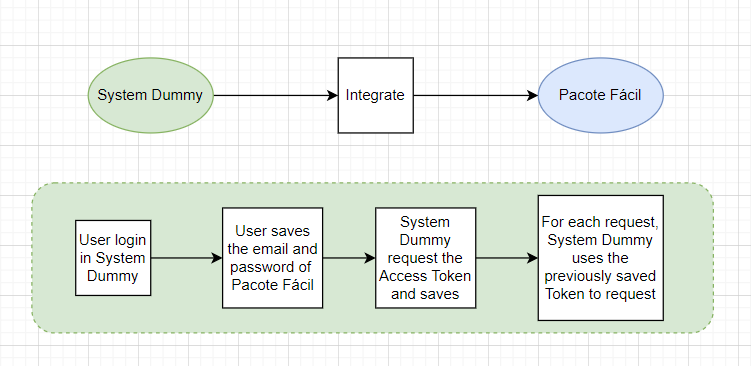
It is important to say that not all endpoints need to be implemented to integrate with the Pacote Fácil, check your needs and use whatever is necessary.
| Sandbox test | https://apihom.packetbr.com.br |
| Production | https://api.packetbr.com.br |
| Code | Status | Description |
|---|---|---|
| 200 | OK | Everything worked as expected. |
| 400 | Bad Request | The request was unacceptable, often due to missing a required parameter. |
| 401 | Unauthorized | No valid API key provided. |
| 403 | Forbidden | The API key doesn't have permissions to perform the request. |
| 503 | Service Unavailable | Something went wrong on Pacote Fácil's end. |
The API will always return a dataset in JSON format with 3 parameters.
		{
	"sucesso": true,
	"mensagem": "Dados atualizados com sucesso!",
	"dados": null
}
| Data | Type | Description |
|---|---|---|
| sucesso | boolean | If True indicates the request was successful |
| mensagem | string | Displays a message if the operation fails |
| dados | json | In case of a data request they will be returned converted to JSON in this field |
https://api.packetbr.com.br/usuario/login
The token is used to make requests, some methods need this authentication to work.
The token obtained is valid for 60 days
Ideally, the token should be saved on your system, associating it with the user who will make the integration. That way it is not necessary to request the token every time you make a request.
| Method | Parameter | Type | Mandatory |
|---|---|---|---|
| POST | string | Yes | |
| POST | senha | string | Yes |
								{
	"sucesso": true,
	"mensagem": "",
	"dados": {
		"idUsuario": "54568",
		"token": "eyJpZCI6IjI2IiwiYWRtaW4iOiIxIiwidmFsaWRhZGUiOiIyMDIxLTA3LTI0In0=.a/BRB6pzGIUVDXW5s5Targ=="
	}
}
								{
	"sucesso": false,
	"mensagem": "Dados inválidos",
	"dados": null
}
https://api.packetbr.com.br/usuario/get/{id}
This endpoint returns a user's registration data.
| Method | Parameter | Type | Mandatory |
|---|---|---|---|
| HEADER | token | string | Yes |
								{
"sucesso": true,
"mensagem": "",
"dados": {
		"idUsuario": "54568",
		"idUsuarioTipo": "1",
		"idEndereco": "1",
		"nome": "Example User Return Name",
		"email": "user.name@example.com",
		"telefone": "+1 123 123 1234",
		"celular": "+1 123 123 1234",
		"cpf": "12345678901",
		"dataNascimento": "0000-00-00",
		"dataUltimoAcesso": "0000-00-00 00:00:00",
		"dataCadastro": "0000-00-00 00:00:00",
		"instagram": "@user.name",
		"suite": "3245",
		"saldo": "232.00"
	}
}
https://api.packetbr.com.br/destinatario/get/{id}
This endpoint returns a recipient's registration data.
| Method | Parameter | Type | Mandatory |
|---|---|---|---|
| HEADER | token | string | Yes |
								{
"sucesso": true,
"mensagem": "",
"dados": {
		"idDestinatario": "1",
		"idUsuario": "1",
		"idEndereco": "2",
		"nome": "Destinatário Teste",
		"tipoPessoa": "F",
		"cnpjCpf": "22222222222",
		"telefone": "",
		"celular": "",
		"status": "1",
		"dataCadastro": "2020-10-26 10:47:38",
		"email": "test.recipient@test.com",
		"nomeUsuario": "Test User",
		"idPais": "1",
		"nomePais": "Brasil",
		"idEstado": "20",
		"nomeEstado": "São Paulo",
		"cidade": "São Paulo",
		"cep": "04304000",
		"bairro": "Centro",
		"rua": "Rua A",
		"numero": "1",
		"complemento": ""
	}
}
https://api.packetbr.com.br/endereco/get/{id}
By default, users, recipients and submissions have an idEndereco associated with them.
To get the address content you must use this endpoint.
| Method | Parameter | Type | Mandatory |
|---|---|---|---|
| HEADER | token | string | Yes |
								{
"sucesso": true,
"mensagem": "",
"dados": {
		"idEndereco": "392",
		"cep": "04304000",
		"rua": "Avenida Fagundes Filho",
		"numero": "999999",
		"bairro": "Vila Monte Alegre",
		"cidade": "São Paulo",
		"idEstado": "20",
		"complemento": "Ap. 1",
		"nomeEstado": "São Paulo",
		"uf": "SP",
		"idPais": "1",
		"nomePais": "Brasil"
	}
}
https://api.packetbr.com.br/endereco/getEstados/{idPais}
This endpoint returns all states for a given country.
| Method | Parameter | Type | Mandatory |
|---|---|---|---|
| HEADER | token | string | Yes |
								{
"sucesso": true,
"mensagem": "",
"dados": [
		{
		 "idEstado": "2",
		 "idPais": "1",
		 "nome": "Acre",
		 "uf": "AC",
		 "ativoEnvios": "1",
		 "qtdEnderecos": "20"
		},
		{
		 "idEstado": "14",
		 "idPais": "1",
		 "nome": "Alagoas",
		 "uf": "AL",
		 "ativoEnvios": "1",
		 "qtdEnderecos": "2"
		}
	]
}
https://api.packetbr.com.br/endereco/getPaises
Here all available countries are returned.
You can check the validations that your system must do for each country in order for your addresses to be accepted.
| Method | Parameter | Type | Mandatory |
|---|---|---|---|
| HEADER | token | string | Yes |
								{
"sucesso": true,
"mensagem": "",
"dados": [
		{
		 "idPais": "1",
		 "nome": "Brasil",
		 "ativoEnvios": "1",
		 "exigeCep": "1",
		 "tamMinCep": "8",
		 "tamMaxCep": "8",
		 "exigeCidade": "1",
		 "exigeBairro": "1",
		 "exigeRua": "1",
		 "exigeNumero": "1",
		 "exigeComplemento": "0",
		 "qtdEstados": "27",
		 "qtdEnderecos": "261"
		}
	]
}
https://api.packetbr.com.br/envio/get/{id}
With this endpoint it is possible to obtain the data of a shipment that has already been created.
| Method | Parameter | Type | Mandatory |
|---|---|---|---|
| HEADER | token | string | Yes |
								{
"sucesso": true,
"mensagem": "",
"dados": {
		"idEnvio": "16",
		"idUsuario": "21",
		"idDestinatario": "11",
		"idEnvioStatus": "6",
		"idTabelaFreteIntervalo": "172",
		"idEndereco": "68",
		"dataSolicitacao": "2020-10-10 09:33:59",
		"pago": "1",
		"incluirSeguro": "1",
		"tarifaSeguro": "1.35",
		"codigoRastreio": null,
		"comentario": "",
		"observacaoCliente": "",
		"pesoKg": "20.000",
		"larguraCm": "20.00",
		"alturaCm": "20.00",
		"comprimentoCm": "20.00",
		"tarifas": "0.00",
		"modalidadeImposto": "2",
		"pagamentos": "219.56",
		"codigoRastreioManual": "NX001113776BR",
		"destinatario": "(11) Elenisse Moreira de Oliveira(Brasil-PE)",
		"nomeUsuario": "(21) JACKES AKIRA MAGARIO",
		"valorTabelaFreteIntervalo": "218.21",
		"idTabelaFrete": "17",
		"descricaoTabelaFrete": "USPS",
		"statusTabelaFrete": "1",
		"idPais": "1",
		"nomePais": "Brasil",
		"idEstado": "2",
		"nomeEstado": "Acre",
		"uf": "AC",
		"cidade": "Camaragibe",
		"cep": "04350555",
		"bairro": "Bairro teste 2",
		"rua": "Rua teste teste 2",
		"numero": "S/N",
		"complemento": "",
		"tipoEnvio": "UPS",
		"descricaoStatus": "Aceito, aguardando envio",
		"totalPreEnvio": null,
		"listaPreEnvios": null,
		"idPreEnvioAtual": null,
		"codigoRastreioPreEnvio": null
		}
}
https://api.packetbr.com.br/envio/getEnvioItens/{idEnvio}
Here are returned the items that were informed of the shipping box
| Method | Parameter | Type | Mandatory |
|---|---|---|---|
| HEADER | token | string | Yes |
								{
"sucesso": true,
"mensagem": "",
"dados": [
		{
		 "idItem": "290",
		 "idEnvio": "180",
		 "idItemCategoria": "1",
		 "descricao": "teste",
		 "quantidade": "1",
		 "valor": "100.00",
		 "hscode": "851712"
		},
		{
		 "idItem": "291",
		 "idEnvio": "180",
		 "idItemCategoria": "2",
		 "descricao": "teste",
		 "quantidade": "2",
		 "valor": "100.00",
		 "hscode": "851712"
		}
	]
}
https://api.packetbr.com.br/envio/getByFilter
Using some filters, through this endpoint it is possible to search and locate a specific shipment.
| Method | Parameter | Type | Mandatory |
|---|---|---|---|
| HEADER | token | string | Yes |
| POST | dataDe | date (YYYY-MM-DD) | Yes |
| POST | dataAte | date (YYYY-MM-DD) | Yes |
| POST | paginacaoPagina | integer | Yes |
| POST | paginacaoQuantidade | integer (10, 20 or 50) | Yes |
| POST | pais | integer | No |
| POST | estado | integer | No |
| POST | status | integer | No |
| POST | idTabelaFrete | integer | No |
| POST | paginacaoOrdem | string ('ASC' / 'DESC') | No |
| POST | paginacaoOrdemPor | string ('idEnvio', 'dataSolicitacao', 'nomeSolicitante', 'nomeDestinatario', 'nomeTabelaFrete', 'idEnvioStatus', 'valorTotal') |
No |
								{
"sucesso": true,
"mensagem": "",
"dados": {
	"paginaAtual": "1",
	"total": "1",
	"totalPaginas": 1,
	"lista": [
			{
			"idEnvio": "182",
			"idUsuario": "21",
			"idDestinatario": "50",
			"idEnvioStatus": "1",
			"idTabelaFreteIntervalo": "97",
			"idEndereco": "434",
			"dataSolicitacao": "2021-08-07 19:35:53",
			"pago": "0",
			"incluirSeguro": "1",
			"tarifaSeguro": "0.00",
			"codigoRastreio": null,
			"comentario": null,
			"observacaoCliente": "teste",
			"pesoKg": "10.000",
			"larguraCm": "10.00",
			"alturaCm": "10.00",
			"comprimentoCm": "10.00",
			"tarifas": "0.00",
			"modalidadeImposto": "2",
			"pagamentos": "0.00",
			"codigoRastreioManual": null,
			"fatorPesoVol": "2500",
			"fatorPesoVolumetrico": "2500",
			"nomeUsuario": "JACKES AKIRA MAGARIO",
			"uf": "SP",
			"nomePais": "Brasil",
			"nomeTabelaFrete": "EXPRESS PAC",
			"descricaoStatus": "Rascunho",
			"valorIntervalo": "85.00",
			"nomeDestinatario": "João Pedro dos Santos",
			"valorTotal": "85.00",
			"totalPreEnvio": null,
			"listaPreEnvios": null,
			"idPreEnvioAtual": "36"
			}
		]
	}
}
https://api.packetbr.com.br/envio/getEnvioStatusList
Here all the statuses that a shipment can have are returned.
| Method | Parameter | Type | Mandatory |
|---|---|---|---|
| HEADER | token | string | Yes |
								{
"sucesso": true,
"mensagem": "",
"dados": [
		{
		 "idEnvioStatus": "1",
		 "descricao": "Rascunho",
		 "ordem": "0"
		},
		{
		 "idEnvioStatus": "3",
		 "descricao": "Envio solicitado",
		 "ordem": "1"
		},
		{
		 "idEnvioStatus": "5",
		 "descricao": "Cancelado",
		 "ordem": "2"
		},
		...
	]
}
https://api.packetbr.com.br/envio/setEnvioExternal
Create a new shipping linked to the user, with only one paramether.
This method is restricted to some customers, if you don't know what to pass at origem, ask the Pacote Fácil administrator.
Currently, only the generation of shipments to Brazil is available in the API.
If the system identifies that any of the measurements are below the minimum necessary to create the shipment, it will be automatically adjusted to the minimum measurement.
If the easy package identifies that the informed recipient already exists linked to the user, it will not be created again.
The sender of the shipment will always be the user who is making the request in the API, the address registered in the system will be used in the creation of the shipment.
There may be more than one freight table, when using the parameter STANDARD or EXPRESS the system will look for the first one available for Brazil in these categories. If you want a freight table for other countries of destination, you must pass the idTablelaFrete
Some types of shipment do not return the pdf label or provide the tracking code, pay attention to this.
Below is some information about what to enter in the following fields:
| tipoFrete or idTabelaFrete | ("STANDARD" or "EXPRESS" to tipoFrete) or (idTabelaFrete from idTabelaFrete) | seguro: | 0 or 1 (False or True) |
| hscode: | Harmonized System (HS) Codes | tipoPessoa: | "F" or "J" (Individual / Company) |
| telefone/celular/cep/cnpjCpf: | Send only numbers | pais: | Use "BR" to Brazil or idPais from Get Countrie |
| rua: | street line 1 | complemento: | street line 2 |
| instrucaoNaoNacionalizacao: | "retorno" or "abandono" | alturaIN,larguraIN,comprimentoIN | Measurements in inches |
| Method | Parameter | Type | Mandatory |
|---|---|---|---|
| HEADER | token | string | Yes |
| HEADER | origem | string | Yes |
| POST | payload | string/json, example:
|
Yes |
								{
"sucesso": true,
"mensagem": "Envio registrado com sucesso!",
"dados": {
		"idEnvio": 398,
		"valorTotal": "24.14",
		"valorFrete": "21.00",
		"valorSeguro": "3.14",
		"codigoRastreio": "IX001553674BR",
		"etiquetaBase64": "cyAyIDAgUgovR3J1dasdDAQvOsrdIRDFEm2TE1RDFEm2TE1vdX1DAQvOsrdasDASdIRDFEm2TE1IDA..."
	}
}
The approval environment of CORREIOS do Brasil is highly unstable and may crash during its tests. If you receive an error like the one below in the approval, it means that your integration was successful and if the CORREIOS were online you would receive a JSON return according to the success example above.
In this case, if you don't want to wait for the environment to return, you can rely on the return JSON above.
								Erro no retorno da API dos correios: (Status: 401 - Unauthorized)

https://apihom.correios.com.br/token/v1/autentica/cartaopostagem
null
https://api.packetbr.com.br/correios/getEtiquetaEnvio/{idEnvio}
If necessary, you can obtain a shipping label again, it is returned in base64 format.
| Method | Parameter | Type | Mandatory |
|---|---|---|---|
| HEADER | token | string | Yes |
								{
"sucesso": true,
"mensagem": "",
"dados": {
		"pdf": "JVBERi0xLjQKMyAwIG9iago8PC9UeXBlIC9QYWdlCi9QYXJlbnQgMSAwIFIKL1Jlc291cmNlcyAyIDA...",
		"tracknumber": "NX003844978BR"
	}
}
https://api.packetbr.com.br/frete/getFretesAvailable
Here all the freight available to the token user will be listed. You can use the idTabelaFrete in to simulate/create a shipment.
The attribute paisesOrigem are the countries that are allowed as shipping origin and the paisesDestino are the countries that can be denstines by the freight table.
The "preEnvio" parameter in the return is a boolean, if it is 0 this freight is available to create shipments. In case of 1 it should be used to create pre-sends. Use is exclusive for each purpose, it is not possible to use a freight marked 1 in pre-shipment to create shipments.
| Method | Parameter | Type | Mandatory |
|---|---|---|---|
| HEADER | token | string | Yes |
								{
   "sucesso":true,
   "mensagem":"",
   "dados":[
      {
         "idTabelaFrete":"43",
         "descricao":"CORREIOS - PAC",
         "modalidadeDistribuicao":"33162",
         "status":"1",
         "tipoFrete": 'envio', // envio or preenvio
         "paisesOrigem":[
            {
               "idPais":"2",
               "permissao":"ORIGEM"
            }
         ],
         "paisesDestino":[
            {
               "idPais":"1",
               "permissao":"DESTINO"
            }
         ]
      }
   ]
}
https://api.packetbr.com.br/frete/getIntervaloByPeso/{idTabelaFrete}
From this end-point it is possible to calculate the value of a shipment before creating it. The parameter {idTabelaFrete} must be obtained from here. Note that the simulation value is not considered safe.
| paisRemetente,ufRemetente,cidadeRemetente, bairroRemetente,ruaRemetente,numeroRemetente, cepRemetente,complementoRemetente |
Sender address data | pais,uf,cidade,bairro,rua,numero, cep,complemento |
Destination address data |
| peso | Weight in kilos | altura,largura,comprimento | Measurements in centimeters |
| ufRemetente and uf | idEstado from Get States endpoint | paisRemetente and pais | idPais from Get Countries endpoint |
| Return "alterado" | Indicates if the measurements needed to be changed to match the minimums and/or maximums of the freight table | Return "prazoDias" | Number of days required to deliver the shipment, if returned blank means information unavailable |
| Method | Parameter | Type | Mandatory |
|---|---|---|---|
| HEADER | token | string | Yes |
| POST | peso | decimal (0.0) | Yes |
| POST | largura | int | Yes |
| POST | altura | int | Yes |
| POST | comprimento | int | Yes |
| POST | paisRemetente | int | Yes |
| POST | ufRemetente | int | Yes |
| POST | cidadeRemetente | string | Yes |
| POST | bairroRemetente | string | Yes |
| POST | ruaRemetente | string | Yes |
| POST | numeroRemetente | string | Yes |
| POST | cepRemetente | string | Yes |
| POST | complementoRemetente | string | Yes |
| POST | idDestinatario | int | Yes |
| POST | pais | int | Yes |
| POST | uf | int | Yes |
| POST | cidade | string | Yes |
| POST | bairro | string | Yes |
| POST | rua | string | Yes |
| POST | numero | string | Yes |
| POST | cep | string | Yes |
| POST | complemento | string | Yes |
								{
    "sucesso": true,
    "mensagem": "",
    "dados": [
        {
            "idTabelaFreteIntervalo": "385",
            "idTabelaFrete": "43",
            "valor": "85.00",
            "peso": "10.000",
            "status": "1",
            "prazoDias": "",
            "stripeTaxaPercentual": "2.99",
            "medidasAlteradas": {
                "alterado": false,
                "largura": "25.00",
                "altura": "25.00",
                "comprimento": "25.00",
                "larguraInches": "10",
                "alturaInches": "10",
                "comprimentoInches": "10",
                "peso": "10"
            }
        }
    ]
}
https://api.packetbr.com.br/preenvio/setPreEnvio
"Pre-Shipping" is a resource used to send your packages to the Pacote Fácil warehouse, so that they can be dispatched from there to their final destinations.
Ex: You have 5 shipments in small packages that are going to Brazil, you put these packages inside a bigger box and send the bigger box to Pacote Fácil, from there, we will separate the shipments individually to be sent.
This method is restricted to some customers, if you don't know what to pass at origem, ask the Pacote Fácil administrator.
| peso | Weight in kilos | altura,largura,comprimento | Measurements in centimeters |
| envios | This parameter is a comma-separated list containing the shipment IDs that will be used in this pre-shipment | idTabelaFrete | must be obtained from here |
| Method | Parameter | Type | Mandatory |
|---|---|---|---|
| HEADER | token | string | Yes |
| HEADER | origem | string | Yes |
| POST | envios | string ("520,601,314") | Yes |
| POST | peso | decimal (0.0) | Yes |
| POST | largura | int | Yes |
| POST | altura | int | Yes |
| POST | comprimento | int | Yes |
| POST | idTabelaFrete | integer | Yes |
| POST | seguro | boolean | Yes |
								{
   "sucesso":true,
   "mensagem":"",
   "dados":{
      "idPreEnvio":3669,
      "valor":11.99,
      "isDraft":false
   }
}
https://api.packetbr.com.br/preenvio/getPreEnvioEtiqueta/{idPreEnvio}
You can obtain a shipping label, it is returned in base64 format. Note that the Label may not be available after a few days.
| Method | Parameter | Type | Mandatory |
|---|---|---|---|
| HEADER | token | string | Yes |
								{
"sucesso": true,
"mensagem": "",
"dados": {
		"idPreEnvio": 398,
		"tracknumber": "IX001553674BR",
		"pdf": "cyAyIDAgUgovR3J1dasdDAQvOsrdIRDFEm2TE1RDFEm2TE1vdX1DAQvOsrdasDASdIRDFEm2TE1IDA..."
	}
}